 汉语
汉语
 English
 Français
 Deutsch




Managing a respiratory protection program involves more than conducting fit tests. There are people to track, appointments to schedule, records to maintain, and program requirements to monitor — often across different locations, systems, and teams.
TSI Link™ for Respiratory Protection brings these activities together in a centralized, cloud-based environment connected with FitPro™ Ultra and PortaCount™ Respirator Fit Testers. The result is a more connected way to manage program information, reduce repetitive administrative work, and see where attention may be needed. Watch the full demo video here.
But getting value from TSI Link platform is about more than knowing what features are available. It is about using those tools together as part of your everyday workflow.
Getting Started with TSI Link for Respiratory Protection
If you are setting up TSI Link for the first time, focus on three steps.
1. Activate your account
After your TSI Link for Respiratory Protection subscription has been established, use your TSI account and the activation information provided to access the platform.
2. Configure your program and data
Review your Settings, select the appropriate dataset, and bring in the program information you need using the supported import process.
Starting with a well-organized data foundation will make the day-to-day workflows easier to use.
3. Connect FitPro™ Ultra
Connect FitPro Ultra to the TSI Link cloud environment and confirm that the appropriate dataset is selected.
Once the connection is established, fit testing activity can become part of your broader TSI Link workflow.
See where your program needs attention
When you are responsible for multiple employees, it can be difficult to quickly answer basic questions: Who has completed a fit test? Who may need follow-up? What is the status of medical clearance or respirator training?
Instead of piecing that information together from separate records, start with Program Status.
Program Status provides a high-level view of your respiratory protection program, including fit testing, medical clearance, and respirator training status. Filters allow you to focus the view on the information that is most relevant to you.
How this helps: A consolidated view makes it easier to identify records that may require attention and decide where to focus your next action.
Try this: Customize the Program Status view around the information you review most frequently so you can return to a useful view of your program without rebuilding it each time.

▶ Watch Program Status in the demo — 1:33
Find the employee information you need — without searching across multiple records
A program-level view tells you where attention may be needed. The next step is understanding what is happening with an individual employee.Manage People gives administrators a central place to view and manage the people included in the respiratory protection program. You can search for an employee and access information associated with that person, including fit testing, medical clearance, respirator training, and other program records.
That means when someone asks, “What is the status for this employee?” you have a single place to start looking.
How this helps: Centralizing employee program information reduces the need to search through disconnected files or spreadsheets and makes it easier to move from a program-level question to the individual record behind it.
Try this: Configure the People Manager view around the information your team uses most often so the most relevant fields are easier to find.

▶ Watch Manage People in the demo — 0:50
Spend less time coordinating appointments and follow-up
Scheduling fit tests, training, and other program activities can create a surprising amount of administrative work.
Someone needs an appointment. Available times have to be communicated. Calendars change. Reminders need to be sent. Employees may need to reschedule.
TSI Link brings scheduling, employee self-scheduling, and automated email communications together to help simplify that process.
Administrators can use the Scheduler to manage appointments for activities such as fit testing, medical clearance, and respirator training. Available appointment slots can also support employee self-scheduling, allowing employees to select from available times through links provided in automated communications.
Let employees take the next step
Instead of relying only on individual back-and-forth emails, automated email templates can support communications such as appointment reminders and notifications related to program status.
This turns scheduling and follow-up into a more structured workflow:
Program need → Communication → Available appointment → Employee action → Updated schedule
How this helps: Automating parts of the communication and scheduling process can reduce repetitive coordination and give employees a clearer path to take action.
Try this: Review which automated email templates are relevant to your program and make sure your available appointment slots reflect when your team can actually perform fit testing or other scheduled activities.


▶ Watch the Scheduler in the demo — 2:05
▶ Watch Automated emails in the demo — 3:23
Keep fit test data connected to your program
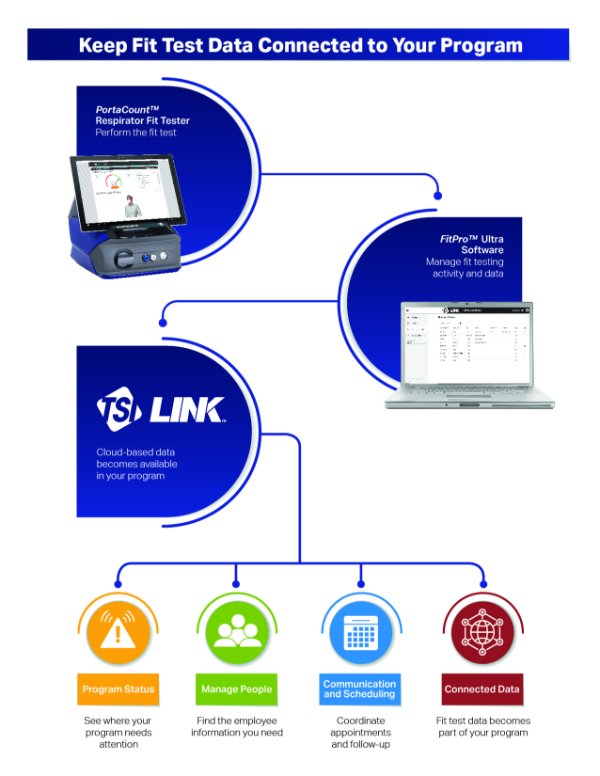
The value of a connected system becomes especially clear when fit testing is taking place.
With TSI Link for Respiratory Protection and FitPro™ Ultra connected through the cloud, PortaCount™ fit testing data can become part of the same environment used to manage your respiratory protection program.
Instead of treating fit testing software and program management as completely separate activities, the connected workflow allows information generated during fit testing to support the broader program.
How this helps: A connected data workflow can reduce duplicate data handling and help keep fit testing information closer to the other activities required to manage the program.
Try this: Before beginning fit testing, confirm that FitPro Ultra is connected to the appropriate TSI Link cloud dataset so the information is going where you expect it to go.

▶ Watch the FitPro™ Ultra connection in the demo — 4:56
Set up TSI Link around the way your program works
Before the day-to-day workflows can help you, TSI Link needs to reflect how your respiratory protection program is organized.
Three areas are especially important during setup: Settings, Datasets, and Data Import.
Configure what you want to track
Settings allow administrators to configure elements of the respiratory protection program, including tracking related to medical clearance and respirator training.
This helps align the information shown in TSI Link with the activities your organization needs to manage.

▶ Watch Settings in the demo — 3:46
Keep different sets of data organized
Datasets provide a way to organize information within TSI Link and determine where records are stored and managed.
Before importing information or beginning a workflow, confirm which dataset is active. This is particularly important when your organization uses more than one dataset for different purposes.

▶ Watch Datasets in the demo — 4:05
Bring existing records into TSI Link
Organizations rarely start with an empty respiratory protection program. Existing employee and program information may already live in spreadsheets or other systems.
TSI Link supports data import using defined CSV templates for supported data types. For organizations that need a more integrated approach, the TSI Link API can also help connect respiratory protection information with systems such as HR, EHS, or training platforms.
How this helps: The goal is not simply to move information into another application. It is to establish a reliable data foundation that can support the program workflows you use afterward.

▶ Watch Data Import in the demo — 4:29
Putting It All Together
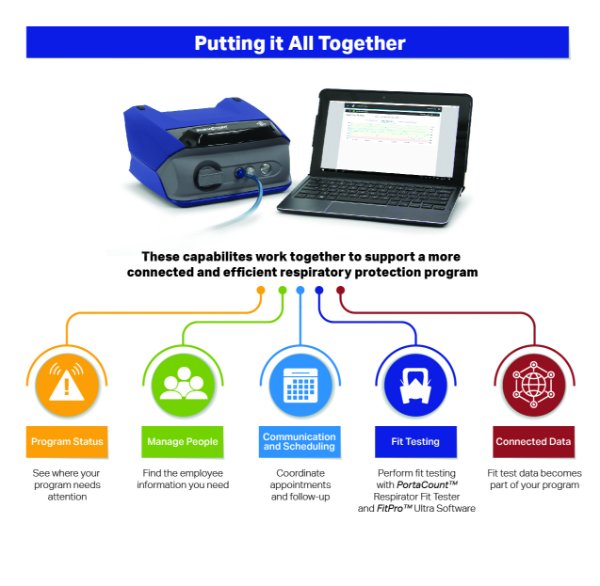
The greatest value comes from using these capabilities as a connected workflow rather than as separate tools. For example:
1. Program Status highlights an area that may need attention.
2. Manage People helps you review the individual employee information behind it.
3. Automated communications and scheduling help move the next activity forward.
4. Fit testing data flows from PortaCount and FitPro Ultra into the connected cloud environment.
5. Updated information becomes part of the program you continue to manage in TSI Link.
This connected approach can help replace disconnected administrative steps with a more consistent way to manage people, activities, and fit testing information across the respiratory protection program.
Start with the Workflow That Creates the Most Work Today
You do not need to change every part of your respiratory protection program at once. Start by identifying where your team spends the most administrative time today.
Is it finding employee information?
Coordinating appointments?
Following up with employees?
Reviewing program status?
Moving fit test information between systems?
Then focus on the TSI Link workflow that addresses that task first. As those connected workflows become part of your program, TSI Link can help you spend less time managing disconnected information and more time acting on what your respiratory protection program needs.
▶ Watch the full TSI Link™ for Respiratory Protection Demo
Questions? We're Here to Help.
Visit TSI Link for Respiratory Protection page for more information.